
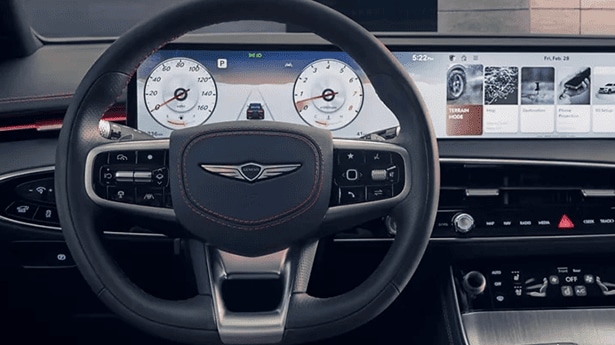
The 27-inch OLED display comes standard on the 2027 Genesis GV80, 2027 Genesis GV80 Coupe, 2027 Genesis G80, refreshed 2027 Genesis GV70, and 2027 Genesis GV60. This panoramic active-matrix panel replaces traditional dual-screen interior configurations across these luxury sedans and SUVs, merging the digital instrument panel and central multimedia interface into one continuous dashboard display.
Luxury car buyers evaluating new vehicles will find this unified display technology integrated across multiple vehicle body styles and powertrains in the lineup. On the flagship 2027 Genesis GV80, starting at an MSRP of $68,900 for the 2.5T Advanced AWD trim, the screen spans across the dashboard directly behind the steering wheel toward the passenger side. Equipped with a 2.5L turbocharged engine generating 300 hp and 311 lb-ft of torque, an automatic 8-speed transmission, and standard all-wheel drive, the GV80 couples strong performance with state-of-the-art cabin technology.
For sedan enthusiasts, the 2027 Genesis G80 includes the identical display interface as standard equipment starting at an MSRP of $59,450. Drivers who prioritize electrification can experience the technology in the 2027 Genesis GV60, which starts at $46,250 for the Standard trim and reaches $69,950 for the high-performance Magma edition producing 805 hp.
Whether navigating daily urban drives in Columbus or heading out on weekend road trips, this expansive screen ensures driving metrics, infotainment, and vehicle settings remain easily viewable. You can explore these models in our new Genesis inventory online or visit our showroom on Morse Road to experience the screen setup in person. For immediate questions about incoming trim allocations, feel free to give our team (614) 363-3170 a call directly.
What Resolution and Panel Technology Powers the LG Display Automotive OLED Setup?
Flexible plastic OLED (P-OLED) technology enables the 27-inch display to achieve ultra-high-definition clarity and exceptional contrast, setting a new standard in automotive screens. This flexible architecture allows the display to contour naturally along the dashboard surface while maintaining structural durability, heat resistance, and anti-glare legibility under intense outdoor light.
Unlike traditional liquid crystal displays (LCD) that require a constant background light source, organic light-emitting diode (OLED) technology utilizes self-illuminating pixels. Each individual pixel emits its own light and turns completely off when displaying black tones. This capability yields true, deep black levels and an infinite contrast ratio, eliminating the gray background wash typical of conventional automotive digital gauge clusters during night driving.
The underlying P-OLED substrate employs a flexible plastic material rather than rigid glass. This design choice serves two main functions in vehicle interiors:
- It permits a subtle horizontal curve across the dashboard layout, optimizing view angles for the driver without causing visual distortion for the front passenger.
- It provides high vibration resistance and impact durability, meeting strict automotive safety standards while enduring temperature fluctuations inside sealed vehicle cabins.
Furthermore, active-matrix driving circuitry ensures rapid pixel response times, virtually eliminating motion blur when animating high-speed digital tachometer needles or streaming live camera graphics. If you are comparing new innovations against previous model years, browsing our pre-owned luxury vehicle selection reveals how cockpit display tech has rapidly evolved over recent design cycles.
What Parts of the Cabin Does the Display Combine and How Does Split-Screen Work?
Combining the driver gauge cluster and infotainment screen, the 27-inch OLED creates a seamless Integrated Cockpit (ccIC) experience inside Genesis vehicles. Split-screen functionality allows drivers to segment the panel into customized, active zones for driving instrumentation, turn-by-turn guidance, media controls, and climate feedback simultaneously.
By eliminating the traditional plastic housing divider that historically separated instrument gauges from center console media screens, Genesis creates a clean, uninterrupted horizontal glass expanse. The left portion of the screen sits directly in the driver’s line of sight, presenting vital operational metrics such as speed, fuel or battery level, range estimates, and driver assistance indicators. The central and right sections transition into interactive media, navigation, and cabin comfort controls accessible by touch or central physical inputs.
Multi-zone split-screen capability gives drivers precise control over screen real estate through several input methods:
- Direct capacitive touch inputs across the middle and passenger-side screen surface.
- A console-mounted rotary glass controller that allows tactile browsing without reaching toward the dash.
- Integrated steering wheel control pads for fast thumb-operated menu scrolling.
- Contextual voice recognition commands for hands-free adjustment of cabin settings.
Drivers commuting along the Olentangy River corridor in Worthington can set their display to show full-screen map graphics across two-thirds of the panel while keeping essential trip data pinned to the driver gauges. If you are exploring trade-in opportunities toward a new cockpit setup, our inventory specialists can also walk you through options among our certified pre-owned Genesis vehicles to compare different cabin configurations.
Can Driver Display Graphics Be Customized and What Appears While Driving?
Genesis drivers can personalize their 27-inch OLED display with themes, drive modes, maps, and widgets to tailor their cockpit visuals. While driving, the display presents real-time telemetry like speed on the left side, while dedicating the right and center sections to active safety status, audio playback, and navigation guidance.
Selecting different vehicle drive modes actively shifts the visual theme and layout of the gauge cluster. Switching to Sport mode converts digital dial graphics into dynamic tachometers with aggressive red ambient accenting, while Comfort or Eco modes transition the display to serene, minimalist gauge designs with soft hues. Drivers can also select full-screen digital gauge themes or minimize traditional dials entirely in favor of an expansive central driver map display.
Integrated driver assistance systems stream live graphical feedback directly onto the screen while on the road:
- Adaptive cruise control displays real-time radar distance tracking and lane-centering markers.
- Blind-spot detection projects live camera video feeds from side-mirror cameras onto the left or right gauge dial when activating a turn signal.
- Forward collision warnings and lane departure alerts generate visual pop-up notifications directly in the driver’s immediate field of view.
Wireless smartphone integration via wireless Apple CarPlay and Android Auto mirrors mobile applications across the central section, letting drivers control playlists, podcasts, and contacts while keeping speed and safety data uncompromised on the driver gauge side. To help tailor a purchase plan for a tech-equipped model, complete an online credit application before visiting our finance department.
Can the Middle Part of the Screen Show Navigation Prompts and Driving Alerts?
Navigation prompts, camera views, and safety alerts appear in 3D on the central area of the 27-inch OLED, keeping drivers informed without distraction. By positioning directional arrows, distance countdowns, and live traffic lane guidance in the display center, drivers stay informed without turning away from the road ahead.
When drivers take the GV80 on a highway test loop, they usually ask if turn-by-turn map prompts can appear in the center of the display rather than forcing them to glance over at a traditional central console. The ccIC architecture fulfills this exact request by rendering augmented-reality navigation prompts right in the center panel, superimposing directional guide arrows directly over a real-time front video camera feed.
In addition to map directions, the middle section displays high-resolution camera graphics and vehicle warnings:
- A 360-degree view from the surround-view camera system appears when reversing or maneuvering at low parking speeds.
- Tire pressure monitor status, active drive mode configurations, and trip computer data can be pinned as central widgets.
- Over-the-air ( OTA) update notifications inform drivers when background software enhancements have updated screen capabilities or system responsiveness.
This centralized layout minimizes driver eye movement and reduces cognitive load, providing critical navigation guidance exactly when and where it is needed most.
Common Questions About the Genesis 27-Inch OLED Display
Q: Is the 27-inch OLED display standard equipment on the 2027 Genesis GV80 2.5T Advanced AWD?
Starting at $68,900, the 2027 Genesis GV80 2.5T Advanced AWD includes the 27-inch OLED display as a standard feature. This model features a 2.5L engine producing 300 hp and 311 lb-ft of torque, an automatic 8-speed transmission, EPA-estimated fuel economy of 19 city / 24 hwy MPG, seating for 7, a cargo capacity of about 12 cu ft, and a towing capacity of 6,000 lbs.
Q: How much cargo space remains in the Genesis GV80 when choosing a 5-passenger trim over a 7-passenger model?
While 7-passenger variants like the 2.5T Select AWD offer about 12 cu ft of cargo volume behind the third row, 5-passenger models like the 3.5T Prestige Black AWD provide about 39 cu ft of rear cargo space. The 3.5T Prestige Black AWD features a curb weight of 5,250 lbs, a payload capacity of 923 lbs, and EPA fuel efficiency ratings of 17 city / 22 hwy MPG.
Q: Does the 27-inch screen support wireless smartphone integration across all vehicle trims?
Every Genesis vehicle equipped with the 27-inch OLED display includes wireless Apple CarPlay and Android Auto as standard software features. Drivers can pair their mobile devices wire-free to stream music, access phone contacts, and display smartphone mapping applications across the central segment of the wide screen.
Q: How do physical controls interact with the 27-inch touch panel while driving?
In addition to direct touchscreen inputs on the glass panel, Genesis includes a console-mounted rotary shift-by-wire dial and a dedicated glass touch controller. This dual-input approach allows drivers to navigate menus, zoom on navigation maps, and change audio stations using physical dial turns without leaning forward to touch the glass.
Q: How do over-the-air updates affect the display system over time?
Genesis incorporates extensive over-the-air ( OTA) update capabilities that download software enhancements wirelessly to the vehicle. These remote updates can introduce refined display widget graphics, optimize screen menu layouts, improve system boot times, and update built-in map data without requiring a physical visit to a facility.
Prices and MSRP referenced in this article are estimates for informational purposes only and do not constitute an offer to sell. See dealer for complete details. Fuel economy estimates shown may differ from official EPA ratings and should not be relied upon as a guarantee of actual vehicle performance.
